-
 VecDXF: Export MiraMon vector layers to DXF files
Direct access to online help: VECDXF
Access the application from the menu: "File | Export | PNT, ARC, NOD, POL, VEC -> DXF"
Presentation and options
This application converts structured vector files containing points, arcs, polygons, or nodes (PNT, ARC, POL, or NOD formats) and unstructured vector files containing points, lines, or polygons (VEC format) to DXF format, which can be imported into AutoCAD (see the DXFIN command in the AutoCAD manual) and other applications, such as MicroStation, CorelDraw, or MS Word. The application also exports the third dimension (Z coordinate), if present in the source formats.
The application provides two options:
VecDXF:
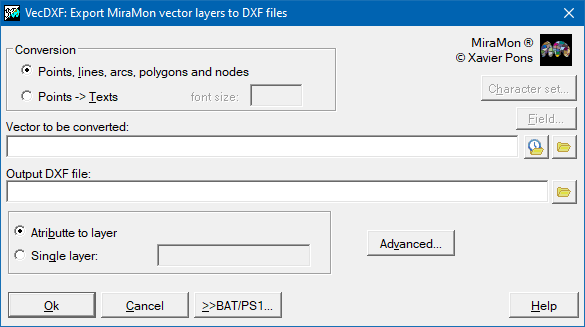
This option performs direct transformation of points and nodes to points, lines and arcs to open polylines, and polygons to closed polylines.
VecDXF text:
This option transforms points into DXF texts (the attribute becomes the text).
Polygons are converted to closed polylines; lines and arcs are converted to open polylines; and points and nodes can be converted to either points or text. The maximum number of vertices per line or polygon is 4.2 million.
The generated DXF file contains a header specifying the geographic extent of the file and the layer definitions.
When exporting attributes as DXF text, point attributes may contain accented characters. However, the appropriate character encoding must be selected according to the application that will read the DXF file:
- For AutoCAD 2000, FreeHand 8, and MicroStation 95, select ANSI-1252.
- For MS Word 2000 and CorelDraw 8, select OEM-850.
In MicroStation 95, accented characters appear as asterisks after importing the DXF file. To correct this, change the font. One possible procedure is:
- Zoom out to display the entire drawing.
- Use the "Fence" tool to select all the text.
- In the Text Tools window, click "Change Text Attributes".
- Select a font that supports Windows-ANSI accented characters, such as 105-INTL_ISO.
- Select "Use Fence".
- Click within the area selected by the Fence tool.
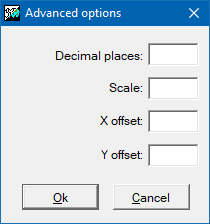
The application allows you to apply scaling and coordinate offsets. This makes it possible to assign ground coordinates to a DXF file that does not already have them or to shift the entire drawing to a smaller coordinate range (for example, some applications may have difficulty opening DXF files containing UTM coordinates expressed in meters).
Notes:
- Numeric or alphanumeric attribute values become layer names in the DXF file. In accordance with the DXF format specified by Autodesk, layer names are converted to uppercase and truncated to 31 characters. Characters not supported by the DXF format are replaced as appropriate (for example, 'À' becomes 'A', and '$' becomes '_').
- For files linked to a database, only one attribute can be exported. We recommend exporting the ID_GRAFIC field if the file is intended to be imported back into MiraMon. This allows all attributes to be restored using the "Physical Join" command in MiraDades.
- Negative numeric attribute values retain their minus sign in the layer name.
- Supported range for integer numeric attributes: -2147483648 to 2147483647 (long).
- Real-number attributes can only be exported as text because layer names cannot contain decimal points. If export as a layer name is forced, the decimal point is replaced with an underscore.
- Attributes can be omitted, placing all elements on a single layer. When exporting as text, all DXF text elements are placed on a single layer, and the attribute value becomes the text content.

Dialog box of the application
Syntax
Syntax:
- VecDXF 1 VectorFileName DXFFileName [/ESCALAT] [/DESPLAC_X] [/DESPLAC_Y] [/N_DECIMALS] [/UNICAPA] [/TAULA] [/CAMP] [/CONSIDER_NODATA] [/REPE] [/ALCADA]
- VecDXF 2 VectorFileName DXFFileName TextHeight [/ESCALAT] [/DESPLAC_X] [/DESPLAC_Y] [/N_DECIMALS] [/UNICAPA] [/JOC_CARAC] [/TAULA] [/CAMP] [/CONSIDER_NODATA] [/REPE] [/ALCADA]
Options:
- 1:
Direct transformation. From points and nodes into points. From lines and arcs into open polylines. From polygons into closed polylines.
- 2:
Transforms points into texts.
Parameters:
- VectorFileName
(Vector file name -
Input parameter): Name of the vector file (PNT, ARC, NOD, POL, VEC) to convert.
- DXFFileName
(DXF file name -
Output parameter): Name of the output DXF file.
- TextHeight
(Text height -
Input parameter): Size of the DXF text in map units.
Modifiers:
/ESCALAT= (ESCALAT) Scale applied to X,Y coordinates. Default value is 1. (Input parameter) /DESPLAC_X= (X shift) Shift applied to X coordinates. Default value is 0. (Input parameter) /DESPLAC_Y= (Y shift) Shift applied to Y coordinates. Default value is 0. (Input parameter) /N_DECIMALS= (Decimal places) Number of decimal places written in the coordinates of the output DXF file; default value is 6. (Input parameter) /UNICAPA= (Unicapa) DXF layer name if all elements should be on the same layer. If omitted, each element's attribute becomes its layer. (Input parameter) /JOC_CARAC=
(Character set)
Character set for texts; may be ANSI-1252 or OEM-850. Default value is ANSI-1252. (Input parameter) /TAULA /CAMP= (Camp) /TAULA= and /CAMP= indicate the database field exported as a layer or text in the DXF. For more information on these parameter values, see the general syntax document. (Input parameter) /CONSIDER_NODATA (NoData values) Include NoData values in the query. It only takes effect when there is an attribute selection. (Input parameter) /REPE= (Repe) Indicates which record is chosen when there is more than one record per graphic identifier (multiple record). For more information, see the general syntax document. (Input parameter) /ALCADA= (Height) Indicates which of the possible heights is written in the DXF. For more information, see the general syntax document. (Input parameter)
AutoCAD, CorelDraw, FreeHand, MicroStation, MS-Word, are registered trade marks of their owners. MiraMon is a registered trade mark of Xavier Pons.