-
 SDEMM: Conversion from ArcSDE spatial databases to MiraMon formats
Direct access to online help: SDEMM
Access the application from the menu: "File | Import | Vectors and/or databases | ArcSDE -> PNT, ARC/NOD, POL"
Presentation and options
ArcSDE is an interface for accessing geodatabases designed by ESRI. It is able to use a database manager such as Oracle. SDEMM imports an ArcSDE layer to the MiraMon topological format (PNT, ARC/NOD, POL).There are several options:
It is possible to access an ArcSDE server using an IP name and address and the instance. Each server may have one or more geodatabases which can be accessed with a user-name and a password. In order to facilitate geodatabase use, ArcSDE allows you to structure the information in layers which contain only one type of object and which display a homogeneous table of attributes (the same attributes for each object of the layer). SDEMM allows you to import a layer of a database of an instance of an ArcSDE server.
The program allows you to import point layers, arcs/nodes or polygons from the ArcSDE server. If there is information regarding the Z of each vertex, this is also incorporated. The attributes of the objects of the layer are converted into attributes of the objects stored in the main table of MiraMon files. ArcSDE can contain multipart- or multiline-type objects when these share the same attributes. When importing to MiraMon a number of different point and line objects respectively are generated and the same thematic attributes are assigned to the main table.
If there is an importation error, a message appears clearly indicating the nature of the error or, if this is not the case, a code appears whose meaning can be found by consulting the miscellaneous section.
In order to speed up the extraction of data from the ArcSDE server, point, arc and polygon files can be imported in two ways:
Option 0:
Shows information regarding the contents of the ArcSDE database.
Option 1:
Imports an ArcSDE layer in the same way as option 2, but structures the imported file so that it contains the verified topology. For ArcSDE layers of polygons, polygon topology is also generated; the arc file does not display duplicated edges (the arc file is smaller) and the polygon file does not display overlays. It is also possible to eliminate occasional micropolygons. This is the recommended option. In the case of line ArcSDE layers, arc/node topology is generated, eliminating intersections and overlays. In the case of point layers, objects situated in almost the same place are recast into a single point (infinitesimal tolerance). If the database records are different, the main table created contains a multiple record for each graphic object. Option 0 shows information regarding the contents of the ArcSDE database.
Option 2:
Carries out a simple format importation without modifying the geometry or the topology of the graphic entities: files are generated that can display similar points (infinitesimal tolerance), intersections between lines, overlays of polygons or other undesired situations in a topological model. To subsequently construct the topology on this file would involve the combined use of the topological structuring tools: structuring the points, arcs (with LINARC) or polygons (making a new cycle of polygons with CICLAR and transfer the attributes between polygons with ATRITOP).
Option 3:
Does not carry out any importation, but generates a layer REL instead. This REL can be modified so that the user can enter field descriptions or any other type of metadata regarding the ArcSDE layer.
Option 4:
Import of an SDE raster to MiraMon raster format. Level and envelope may be specified. Downloading the maximum resolution level is not recommended.
Option 5:
Generation of a layer REL for an ArcSDE raster.
The program requires the DLLs sde.dll, pe.dll, sg.dll and MSVCR71.dll which can be downloaded from general.mmz file and installed.
The drivers of the ArcSDE client are not compatible with Windows 95, Windows 98 or Windows ME. Consequently, it is not possible to access these data for computers with these operating systems.

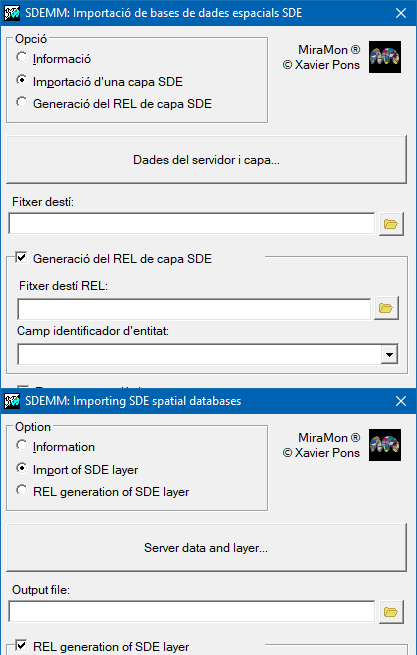
Dialog box of the application
Syntax
Syntax:
- SDEMM 0 Server Instance Database User Password FileInfo
- SDEMM 0 Server Instance Database User Password
- SDEMM 1 Server Instance Database User Password SDELayer MiraMonLayer [/NOM_REL_DE_CAPA] [/AREA_MIN] [/AREA_PERI_MIN] [/NEXE_CRITERIS] [/FONDRE] [/ATRIB_ELIM] [/ALGORISME] [/SIMPLIFICA_VERTEXS] [/ID_ENTITAT] [/CLAU_COD]
- SDEMM 2 Server Instance Database User Password SDELayer MiraMonLayer [/NOM_REL_DE_CAPA] [/ID_ENTITAT] [/CLAU_COD]
- SDEMM 3 Server Instance Database User Password SDELayer LayerCapa [/ID_ENTITAT] [/CLAU_COD]
- SDEMM 4 Server Instance Database User Password SDELayer RasterId [/ID_ENTITAT] [/CLAU_COD] [/NIVELL] [/XMIN] [/XMAX] [/YMIN] [/YMAX]
- SDEMM 5 Server Instance Database User Password SDELayer LayerCapa RasterId [/ID_ENTITAT] [/CLAU_COD]
Options:
- 0:
Information
- 1:
Importation to MiraMon format and topological structuring (recommended).
- 2:
Importation to MiraMon format.
- 3:
Generation of a layer REL.
- 4:
Import of an SDE raster to MiraMon raster format. Level and envelope may be specified. Downloading the maximum resolution level is not recommended.
- 5:
Generation of a layer REL for an ArcSDE raster.
Parameters:
- Server
(Server -
Input parameter): Server is the name of the server where the layer you wish to import is stored. For example, 158.109.57.114.
- Instance
(Instance -
Input parameter): Is the instance where the layer you wish to import is located. For example, 5153.
- Database
(DataBase -
Input parameter): DataBase is the name of the database in the server where the layer you wish to import is stored. For example, SDE_RefDatabase. If you type an asterisk ('*'), you will obtain information regarding all the databases. It is necessary to type an asterisk on Oracle managers.
- User
(User -
Input parameter): Is the username for this server and this instance.
- Password
(Password -
Input parameter): Is the user password for this server and this instance. If you type an asterisk '*', the program asks for it when it needs it (only once).
- FileInfo
(Info File -
Output parameter): InfoFile (without extension) uses the extension '.txt' and will contain the list of layers available on this server, this instance and this database, for this user. If it is not included, the information will disappear from the screen.
- SDELayer
(SDE Layer -
Input parameter): SDELayer is the name of the layer that you wish to import from the ArcSDE database.
- MiraMonLayer
(MiraMon Layer -
Output parameter): MiraMonLayer (without extension) is the output layer. A layer in MiraMon format is generated (PNT, ARC/NOD or POLS depending on the type of layer that you request from ArcSDE) with this pattern name. If you type an asterisk,'*', the file will be generated temporarily and eliminated when no longer needed.
- LayerCapa
(LayerCapa -
Output parameter): It is the name of the generated layer REL file that links to the capaSDE layer.
- RasterId
(Raster ID -
Input parameter): Numeric identifier of the raster within the ArcSDE layer.
-
(Raster layer -
Output parameter): (no extension) is the MiraMon raster output file (IMG). Asterisk '*' creates a temporary file removed when no longer needed.
Modifiers:
/AREA_MIN=
(Minimum Area)
Minimum allowed area for a polygon. Below this value, the polygon is not imported or, if it was created during structuring, it is deleted. (Input parameter) /AREA_PERI_MIN=
(Minimum perimeter area)
Minimum allowed area / perimeter ratio for a polygon. Below this value, the polygon is not imported or, if it was created during structuring, it is deleted. (Input parameter) /NEXE_CRITERIS=
(Nexus criteria)
In the case of indicating the two previous criteria, do not import or eliminate the polygons that meet the two conditions at the same time (AND), or those that meet at least one (OR). The default value is AND. (Input parameter) /FONDRE=
(Fuse micro-polygons)
Indicates to which polygon is assigned the space occupied by the micro-polygon that disappears in the previously described cases of elimination. Indicate POL_GRAN if assigning the space to the contiguous polygon with the largest area is desired. The default value is FRONTERA_MES_LLARGA which implies that the longest arc of the disappearing micropolygon is eliminated. (Input parameter) /ATRIB_ELIM=
(Eliminate by attribute)
The polygon that absorbs the micropolygon inherits its thematic attributes (not the geometric-topological ones) if the value is 1, generating multiple records if they were different from those of the large polygon. The default value is 0, which implies that the attributes of the micropolygon are lost. (Input parameter) /ALGORISME=
(Algorithm)
This parameter determines the type of algorithm the application uses to split vectors during topological structuring.- ESCOMBRATGE: based on the Bentley-Ottmann segment intersection algorithm.
- DIRECTE: based on pairwise comparison of all segments to determine intersections between vectors.
- AUTOMATIC: the program automatically determines which of the two algorithms to use.
(Input parameter) /SIMPLIFICA_VERTEXS
(Simplifies vertices)
Simplifies the intermediate vertices of the arcs, as long as this does not imply a change in the topology. (Input parameter) /NOM_REL_DE_CAPA= (Rel de capa) NOM_REL_DE_CAPA is the name of the layer REL that is generated and links with the SDElayer. (Input parameter) /NIVELL=
(Level)
Raster resolution level to import (/NIVELL=). Defaults to 0 if omitted. (Input parameter) /XMIN=
(Minimum X)
Minimum X coordinate of the envelope (/XMIN=). (Input parameter) /XMAX=
(Maximum X)
Maximum X coordinate of the envelope (/XMAX=). (Input parameter) /YMIN=
(Minimum Y)
Minimum Y coordinate of the envelope (/YMIN=). (Input parameter) /YMAX=
(Maximum Y)
Maximum Y coordinate of the envelope (/YMAX=). (Input parameter) /ID_ENTITAT= (ID Entity) Indicates the field name of the SDElayer which will act as identifier for the entity. If you select this parameter, the main table will contain two fields and the secondary one will contain as many fields as the SDElayer (except the field which contains the spatial information (Shape). (Input parameter) /CLAU_COD (Encoded key) Indicates that the password is encoded. (Input parameter)