-
 J2KIMG: Conversion between JPEG2000 and IMG or JPEG raster formats
Direct access to online help: J2KIMG
Access the application from the menu:
"File | Import | Rasters | JPEG2000 -> IMG, JPG, RGB"
"File | Export | IMG, JPG, RGB, MrSID, ECW -> JPEG2000"
Presentation and options
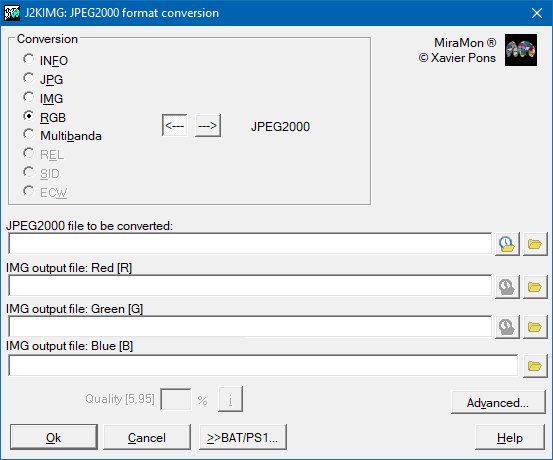
This application allows you to obtain the information of the internal metadata of the JPEG2000 format, to import a JPEG2000 to a JPEG format (grey or RGB, depending on the JPEG2000 file) or to extract between one and three IMG bands of a JPEG2000.Thereby, depending on your interest the program allows you to execute different options:
When the JPEG2000 images have been compressed without loss, it can have sense to recover the images as IMG files to analyse them, although these file might need much more disc space than the original images, and if the images need more than 2 Gbyte for spectral band it could be impossible to convert. So, the application has the following options:
Metadata:
Shows the metadata of the JPEG2000 file.
JPEG:
This generates 1 JPEG file from a JPEG2000 image
IMG:
This generates 1 IMG file from a grey JPEG2000 file
IMG MULTI:
This generates 3 IMG files from a 24 bit JPEG2000 file.
N IMG:
Generates n files IMG from a JPEG2000 file.
JPEG2000 from a JPEG file:
Generate a JPEG2000 file from a JPEG file.
JPEG2000 from 1 IMG file:
Generate a Grey JPEG2000 file from 1 IMG file.
A 24 bits JPEG2000 from 3 IMG files:
Generates a 24 bits JPEG2000 from 3 IMG files.
JPEG2000 MULTI:
Generates a multiband JPEG2000 file from n IMG files.
REL:
Generates a JPEG2000 file from a REL file.
SID:
JPEG2000 file from a SID file.
ECW:
Generate a JPEG2000 file from an ECW file.
The JPEG2000 files are rasters highly compressed thanks to the use of transformed wavelet. JPEG2000 uses typically degrading compression (it also named unconservative, with loss, or lossy), for being the one that more strongly compresses the image; despite this unconserving character, the images usually have a visual aspect very similar to the original ones, unless they have been generated at compression levels extremely raised; this is an important difference with regard to the JPEG conventional format, which starts presenting visual gadgetry at minor levels of compression. On the other hand, the JPEG format can also compress in an efficient way even without degrading the values of the original image (conserving compression, without loss, or lossless), even if in this case the levels of compression are not so high.

Dialog box of the application
Syntax
Syntax:
- J2KIMG 0 JPEG2000File [/GMLBOX] [/MRSID]
- J2KIMG 1 JPEG2000File JPEGFile [/QUALITAT] [/GMLBOX] [/FWORLD] [/MRSID]
- J2KIMG 2 JPEG2000File IMGFile [/GMLBOX] [/MRSID] [/NODATA]
- J2KIMG 3 JPEG2000File IMG_R_File FitxerIMG_G_File IMG_B_File [/GMLBOX] [/MRSID] [/NODATA]
- J2KIMG 4 JPEG2000File PatternFile [/GMLBOX] [/MRSID] [/NODATA]
- J2KIMG 5 JPEG2000File JPEGFile [/QUALITAT_J2K] [/GMLBOX] [/FWORLD]
- J2KIMG 6 JPEG2000File IMGFile [/QUALITAT_J2K] [/GMLBOX] [/FWORLD]
- J2KIMG 7 JPEG2000File IMG_R_File FitxerIMG_G_File IMG_B_File [/QUALITAT_J2K] [/GMLBOX] [/FWORLD]
- J2KIMG 8 JPEG2000File ListFile [/QUALITAT_J2K] [/GMLBOX] [/FWORLD]
- J2KIMG 9 JPEG2000File REL_File [/QUALITAT_J2K] [/GMLBOX] [/FWORLD]
- J2KIMG 10 JPEG2000File SIDFile [/QUALITAT_J2K] [/GMLBOX] [/FWORLD]
- J2KIMG 11 JPEG2000File ECWFile [/QUALITAT_J2K] [/GMLBOX] [/FWORLD]
Options:
- 0:
Shows the metadata of the JPEG2000 file.
- 1:
This generates 1 JPEG file from a JPEG2000 image
- 2:
This generates one IMG file from a grey JPEG2000 file
- 3:
This generates three IMG files from a 24 bit JPEG2000 file.
- 4:
Generates n files IMG from a JPEG2000 file.
- 5:
Generate a JPEG2000 file from a JPEG file.
- 6:
Generate a Grey JPEG2000 file from 1 IMG file.
- 7:
Generates a 24 bits JPEG2000 from 3 IMG files.
- 8:
Generates a multiband JPEG2000 file from n IMG files.
- 9:
Generates a JPEG2000 file from a REL file.
- 10:
Generates a JPEG2000 file from a SID file.
- 11:
Generates a JPEG2000 file from an ECW file.
Parameters:
- JPEG2000File
(JPEG2000 File -
Input parameter): Is the name of the JPEG2000 file to transform (for options 1..4) or the result of the transformation (options 5..11).
- JPEGFile
(JPEG File -
Output parameter): Is the name of the JPEG file resulting from the transformation (option 1) or to transform (option 5).
- IMGFile
(IMG File -
Output parameter): Is the name of the IMG file resulting from the transformation of a single-channel JPEG2000 (grey, option 2) or to transform (option 6).
- IMG_R_File
(Red IMG File -
Output parameter): Is the name of the IMG file resulting from the transformation of each band of the RGB triplet (option 3) or to transform (option 7).
- PatternFile
(Pattern File -
Output parameter): It is the name pattern of the IMG files resulting from the transformation of a multiband JPEG2000 file.
- ListFile
(List File -
Input parameter): Is the name of the list file that stores the names of the IMG files to transform to a multiband JPEG2000 file.
- REL_File
(File Name -
Input parameter): Is the REL file name of the IMG file to transform to a JPEG2000 file.
- SIDFile
(SID File -
Input parameter): The SID file name to transform to JPEG2000 file.
- ECWFile
(ECW File -
Input parameter): Is the name of ECW file to transform to a JPEG2000 file.
Modifiers:
/QUALITAT=
(Quality)
Quality of the compression in a range [0,100], where [5,95] is the useful range although in many cases a value will be between 70 and 75 (75 automatically). The low values indicate very few quality but great compression. (Input parameter) /MRSID (MRSID) If specified, the MrSID libraries are used (only for options 2..4); otherwise, the ER Mapper ones. (Input parameter) /NODATA= (Nodata value) Nodata value. (Input parameter) /QUALITAT_J2K= (JPEG2000 quality) Compression quality of a JPG2000 file, in a supraunitary range (value 1 means lossless compression). Default is 20. High values mean less quality but more compression. (Input parameter) /GMLBOX= (GMLBOX) Name of the GML file that for options 0..4 will store the GML information present in the JPEG2000 file, and for options 5..11 will contain the GML information to write into the JPEG2000 file. (Input parameter) /FWORLD= (World File) It generates a world file of the stated extension. It is possible to indicate /FWORLD to generate it using the extension automatically. For JP2 files the extension is always J2W. (Input parameter)