-
 RGBPal: Transformation of images between color spaces
Direct access to online help: RGBPal
Access the application from the menu: "Tools | Image processing | Color space transformations (24->&8, HSI)"
Presentation and options
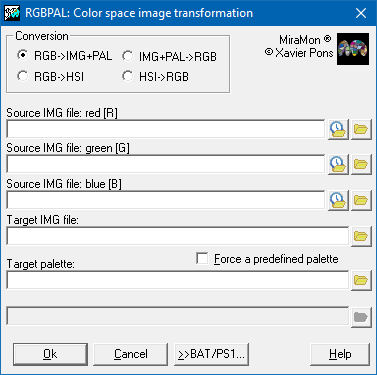
This application performs conversions between different color spaces. For example, it can convert a byte image with a color palette (8-bit color encoding) into three separate byte images (R, G, and B bands, representing 24-bit color encoding). It can also convert three byte images representing the R, G, and B bands into an 8-bit (byte) image with an optimized color palette, obtained by analyzing the most frequent and distinctive colors present in the three source images. Alternatively, the 8-bit image can be generated using a predefined color palette. This algorithm is the same as the one used in MiraMon (under the "File | Open raster | Open 24-bit raster as 8-bit"), which also provides additional functionality not available in this application.
Finally, this application also converts images from the RGB color space to the HSI (Hue, Saturation, Intensity) color space and vice versa. This process is useful for performing operations in the HSI color space, such as contrast enhancement, before converting the image back to RGB. It can also be used to convert an RGB image into a grayscale image by retaining the intensity (I) band and discarding the hue (H) and saturation (S) bands. In this case, both RGB and HSI files must also be in byte format (compressed or uncompressed). The application therefore provides the following options:
Option 1:
This option transforms 3 separate byte images (R, G and B bands) to an IMG file with a color palette.
Option 2:
This option transforms an IMG file with a color palette to 3 separate byte images (R, G and B bands).
Option 3:
This option transforms the RGB color space to the HSI color space.
Option 4:
This option transforms the HSI color space to the RGB color space.

Dialog box of the application
Syntax
Syntax:
- RGBPal 1 FitxerR FitxerG FitxerB FitxerIMGSortida FitxerPAL [/MAP_PAL]
- RGBPal 2 FitxerImatge FitxerPAL FitxerRSortida FitxerGSortida FitxerBSortida
- RGBPal 3 FitxerR FitxerG FitxerB FitxerHSortida FitxerSSortida FitxerISortida
- RGBPal 4 FitxerH FitxerS FitxerI FitxerRSortida FitxerGSortida FitxerBSortida
Options:
- 1:
Transforms 3 separate byte images (RGB) to an IMG file with a color palette.
- 2:
Transforms an IMG file with a color palette to 3 RGB images.
- 3:
Transforms the RGB color space to the HSI color space.
- 4:
Transforms the HSI color space to the RGB color space.
Parameters:
- FitxerR
(File corresponding to the Red component -
Input parameter): RGB file of the Red band.
- FitxerG
(File corresponding to the Green component -
Input parameter): RGB file of the Green band.
- FitxerB
(File corresponding to the Blue component -
Input parameter): RGB file of the Blue band.
- FitxerIMGSortida
(Image file -
Output parameter): Name of the 8-bit output file.
- FitxerPAL
(Palette file -
Output parameter): Name of the palette file DBF, PAL, P65 or P25.
- FitxerImatge
(Image file -
Input parameter): Name of the 8-bit input file.
- FitxerRSortida
(File corresponding to the Red component -
Output parameter): Output RGB file of the Red band.
- FitxerGSortida
(File corresponding to the Green component -
Output parameter): Output RGB file of the Green band.
- FitxerBSortida
(File corresponding to the Blue component -
Output parameter): Output RGB file of the Blue band.
- FitxerHSortida
(H file -
Output parameter): Output H file forming the HSI combination.
- FitxerSSortida
(S file -
Output parameter): Output S file forming the HSI combination.
- FitxerISortida
(I file -
Output parameter): Output I file forming the HSI combination.
- FitxerH
(H file -
Input parameter): H file forming the HSI combination.
- FitxerS
(S file -
Input parameter): S file forming the HSI combination.
- FitxerI
(I file -
Input parameter): I file forming the HSI combination.
Modifiers:
/MAP_PAL
(Force color space to a given palette)
Forces the color space to a given palette. If this parameter is set, the palette is read from disk; otherwise the program writes a palette optimized for this image. (Input parameter)