-
 EscalVEC: Scalling and shifting of vector entities
Direct access to online help: EscalVEC
Access the application from the menu: "Tools | Spatial data management | Scalling and shifting of vector entities"
Presentation and options
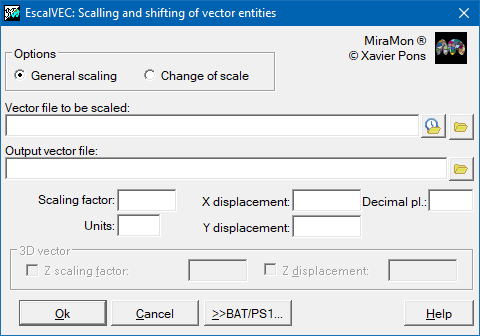
This program performs a change of scale and/or a shift of vector files in non-structured VEC format. It also changes map coordinates to paper coordinates as a prior step for exporting the some drawing packages.
EscalVEC 1:
General scaling
EscalVEC 2:
Change of scale
Scaling option is useful, for example, to convert files having m as reference units to files having km, using a scaling factor of 0.001 and a displacement of 0 in both X and Y axes. It is also useful to add a digit (for ex. 4) to Y UTM coordinates coming from a program that do not support double precision UTM coordinates and, therefore, truncate the first number. This way, if we write Scaling=1, XDisplac=0 and YDisplac=4000000, we will obtain number 4 append on Y UTM coordinates, expressed in m. Conversely, to export MiraMon files to other packages not supporting double precision coordinates, you can use Scaling=1, XDisplac=0, YDisplac=-4000000 and the output file will have Y UTM coordinates lacking the first 4.
The change of scale option is useful as a previous step before exporting a file to a drawing program format (for example, before converting to DXF format).
When the file is 3D it is possible to apply and scale factor and a Z displacement.

Dialog box of the application
Syntax
Syntax:
- EscalVEC 1 FitxerOri FitxerDest Escalat Unitats DesplaçX DesplaçY [Precisió] [/ESCALAT_Z] [/DESPLAC_Z]
- EscalVEC 2 FitxerOri FitxerDest Escala Unitats Xmin Ymin [Precisió] [/ESCALAT_Z] [/DESPLAC_Z]
Options:
- 1:
General scaling. X and Y displacements (XDisplac and YDisplac) are applied after the scaling. Units is the new documented units (Indicate 'x' for leave previous units).
- 2:
Change of scale.
Parameters:
- FitxerOri
(Input File -
Input parameter): Is the input file name to be scaled and/or shifted.
- FitxerDest
(Output File -
Output parameter): Is the reescaled output file name.
- Escalat
(Scaling factor -
Input parameter): Scale factor.
- Unitats
(Units -
Input parameter): New units:
- mm (millimeters)
- cm (centimeters)
- pz o inch
- DesplaçX
(X Displacement -
Input parameter): X Displacement
- DesplaçY
(Y Displacement -
Input parameter): Y Displacement
- Precisió
(Precision -
Input parameter): Is the number of decimal digits written in the output file; it is 3 by default.
- Escala
(Scale -
Input parameter): Scale is the dividend of the final scale: (for ex.: 50000)
- Xmin
(X min -
Input parameter): Coordinate X min. Xmin and Ymin are the coordinates that will be located at the new point 0,0. You can use numbers or use some of the extreme coordinates of the file, writing for example, 'Xmin Ymin'
- Ymin
(Y min -
Input parameter): Ymin and Xmin are the coordinates that will be located at the new point 0,0. You can use numbers or use some of the extreme coordinates of the file, writing for example, 'Xmin Ymin' or 'Xmin Ymax'.
Modifiers:
/ESCALAT_Z= (ESCALAT Z) Is the Z scale factor when the file is a 3D VEC. (Input parameter) /DESPLAC_Z= (DESPLAC Z) Is the Z displacements when the file is a 3D VEC. (Input parameter)