-
 Emissiv: Emissivities calculation
Access this help text as a web page: Emissiv
Presentation and options
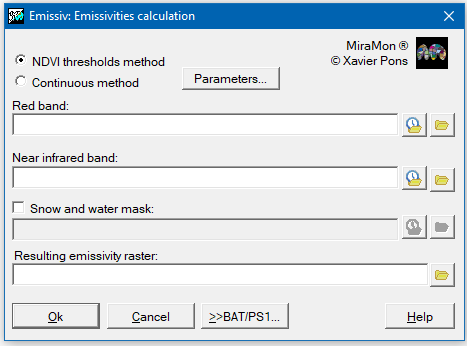
This application allows calculating emissivity based on a red band and an infrared band. A mask could be added for water and snow areas, by allocating a "1" value in water areas and a "2" value in snow areas.
The red band, the infrared band and the mask (in the case it is added) must have the same field, resolution and reference system for a correct functioning in the application.
Two methods are available:
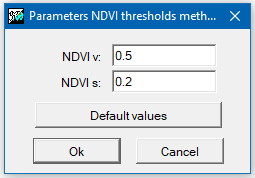
NDVI threshold method:
This option calculates the emissivity using the NDVI threshold method (Sobrino 2000).
Continuous method:
This option calculates the emissivity using the continuous method (Valor and Casselles 2005).
For more information, consult the following references:
Sobrino, J.A. (2000) Teledetección. València, Servei de Publicacions, Universitat de València.
Valor, E., Caselles, V. (2005) Validation of the vegetation cover method for land surface emissivity estimation. In: Caselles, V., Valor, E. i Coll, C. Recent research developments in Thermal Remote Sensing. Research Signpost, India.

Dialog box of the application
Examples
Emissiv 0 D:\dades\b3.img D:\dades\b4.img D:\prova\emisiv.img 0.5 0.2 /MASCARA="D:\prova\Mascara_AguaNieve.img"
Emissiv 1 D:\dades\b3.img D:\dades\b4.img D:\prova\emisiv.img 0.985 0.96 0.2 0.5 0.6 0.2 0.4 0.3 /MASCARA="D:\prova\Mascara_AguaNieve.img"
Syntax
Syntax:
- Emissiv 0 RedBand NIRBand EmisFile NDVIv NDVIs [/MASCARA]
- Emissiv 1 RedBand NIRBand EmisFile e_iv e_is ig iv r4v r3v r4s r3s [/MASCARA]
Options:
- 0:
Calculation of the emissivity by the NDVI threshold method (Sobrino 2000).
- 1:
Calculation of the emissivity by the continuous method (Valor and Casselles 2005).
Parameters:
- RedBand
(Red band -
Input parameter): Input red band file.
- NIRBand
(Near infrared band (NIR) -
Input parameter): Input near infrared band file.
- EmisFile
(Emissivity -
Output parameter): Output file of the result of the emissivity calculation.
- NDVIv
(NDVI vegetation -
Input parameter): NDVI value of a pixel covered in vegetation.
- NDVIs
(NDVI bare soil -
Input parameter): NDVI value of bare soil pixel.
- e_iv (Input parameter): Emissivity of a pixel covered with vegetation.
- e_is (Input parameter): Emissivity of a bare soil pixel.
- ig (Input parameter): NDVI value (to option 1) for a bare soil pixel.
- iv (Input parameter): NDVI value (to option 1) for a pixel covered in vegetation.
- r4v (Input parameter): Reflectance of a pixel in the near infrared band covered with vegetation.
- r3v (Input parameter): Reflectance of a pixel in the red band completely covered with vegetation.
- r4s (Input parameter): Reflectance of a pixel in the near infrared band of bare soil.
- r3s (Input parameter): Reflectance of a pixel in the red band of bare soil.
Modifiers:
/MASCARA= (Mask) Water and snow mask file. This is an optional parameter and must be added "/MASCARA=" before the file location. (Input parameter)