wAnHabit: Habitats analysiswAnHabit: Habitats analysis
wAnHabit is a MiraMon module that allows analyzing layers of habitats in a biogeographic region and determines the representation level (in percentage) of a selection of those habitats on a set of interest areas differentiated by a code (interest areas). It is an application developed to ease the completion of the reports that Govern de Catalunya develops periodically for the Spanish Government and the European Commission, but it has been programmed on a flexible way for, through a configuration file (AnHabConfig.ini), develop a similar analysis in other places in Europe or worldwide.
In the configuration directory of the module, the file AnHabConfig.ini must appear.
This is an INI type file that allows, through the definition of sections and keys, configuring each of the parameters the program needs to function and that are described in this document. The reference of each element will be done by its section and key: "[SECCIO]Clau". Remember that, on an INI file, the order of the sections is irrelevant and also the order of the keys inside a section. Remember too that the lines started with a semicolon (;) are comments that the program ignores. An example appears in brackets to ease the comprehension of the help applying it to a concrete case.
The final result of the analysis is generated in two tables:
All the "layer" files which are referenced in this document are "polygon" type and can be expressed either in MiraMon structured files (POL) or in REL files that target to layers of an Oracle SDO server (to which it is accessed via ODBC drivers installed on Windows) of polygon type or polygon groups (named multi-polygons in SDO). The names of the files are relative to a reference directory (or working space) that can be chosen from a window of the program.
The parameters that can be chosen in the interface are:
Provided that the procedure works correctly, it is essential that these mentioned files have the following features, some of which are configurable (so it is stated on each case):
Nom: Key the value of which it acts as an identifier of this region. For example "Alpine".
Descripció: Key the value where the dropdown appears allowing a more detailed description (more human if needed) or even in another language. For example, "Alpine Region".
COND1_CAMP, COND1_OP and COND1_VALOR: Keys allowing to define the condition the region type has to fulfill. For example, if the previous triplet takes, respectively, the values CODI_REGIO, EQ, alp, the module will interpret that the alpine region is defined by those polygons that fulfill the condition that the field CODI_REGIO is the same (EQ) as “alp”.
Fitxer: Name of the file containing the layers to analyze.
Camp: Name of the file allowing to distinguish between types of areas to analyze; in this field, the areas might be a literal descriptor, a code (for example, ES5130029), etc.
ValorAExcloure: Value of the previous field that indicates the program that that one record (polygon) will be excluded from the analysis. It is, in fact, a tag equivalent to a no-data.
For each habitat the following keys must be stated:
Nom: Identifier given to the habitat type.
Descripció: Textual description appearing on the dropdown of the application interface.
Fitxer: Name of the file containing the habitats layer to analyze. Remember that, as it has been said, it could be a vector file of "polygon" type in the format of MiraMon or a REL pointing to a SDO layer.
NomFitxerSeleccio: name of the file (related to the reference directory) that contains all the habitat codes that want to be taken into account. Each line of the file must have a code. If there are some empty lines, those are ignored. Examples of name: Arxiu HIC.txt, Arxiu HC.txt
CampAreaOri: Numerical field containing the area calculation on which the area proportions calculations want to be done: it is useful if we want to use a calculation on special units, etc. If this key does not appear, the field "AREA" of MiraMon will be used, that uses unities of the Reference System, typically on squared meters (or squared degrees on layers in longitude/latitude).
FactorHa: Since area results are given in hectares, this key allows us to specify the number among which the area value has to be divided to obtain the hectares. For example, if it has the area on squared meters, this factor has to be 10000.
CampSeleccio1, CampSeleccio2, ...: Considering that on the same polygon there may be more than one habitat, with these keys the possibility of several names of fields is enabled in order that each field contains the habitat code (and its covering inside the polygon, specified below).
CampRecobriment1, CampRecobriment2, ...: Numerical value stating the covering of the habitat in the polygon. This value has been calculated previously by the user so it is written in this field or fields of the input layer.
IndexRecobriment: Value on which the values of CampRecobriment are expressed. For example, on one area there may be pinewood of white pine mixed with pinewood of stone pine. An observation may have determined that there is a 50% of each. In that case, it is going to be considered a 50% of covering of each species. Two fields would be filled in, with a 5 of covering in each of both, and IndexRecobriment ought to value 10. Note that is possible that IndexRecobriment would be bigger than the sum of the different values CampRecobriment if we consider that there are non-contemplated cases but they occupy the missing proportion.
If a third habitat appeared, three fields with coverings will be filled summing a maximum of 10.
All the intermediate calculations can be consulted in some temporary files that are stated on the section [TEMPORALS]:
The steps taken during the process will be registered on a file of "txt" type that can be configured in the section [PROCEDIMENT] in the key Fitxer1.
Suppose that an analysis of the habitats of Catalonia and habitats of Community Interest in the mediterranean and alpine biogeographic areas is wanted and, on the other hand, in all Catalonia.
In order to do that, a folder named reference directory and a SDO server are enabled. This is available:
The results are placed on the same reference directory and moreover it is wanted:
To configure all this it is required to have all the files in the reference directory specified in the interface and the file AnHabitConfig in the folder of the reference directory.
The file AnHabitConfig.ini that reflect the specifications described until now is:
; The files of this file are always relative to the directory "working area" specified in the application[REGIO_BIOGEOGRAFICA]
Fitxer=regions_bio3_etrs89.rel
REGIO1=ALPINE
REGIO2=MEDITERRANEAN
REGIO3=CATALONIA
[REGIO_BIOGEOGRAFICA:ALPINA]
Nom=Alpine
Descripcio=Alpine region
COND1_CAMP=CODI_REGIO
COND1_OP=EQ
COND1_VALOR=alp
[REGIO_BIOGEOGRAFICA:MEDITERRANIA]
Nom=Mediterranean
Descripcio=Mediterranean region
COND1_CAMP=CODI_REGIO
COND1_OP=EQ
COND1_VALOR=med
[REGIO_BIOGEOGRAFICA:CATALUNYA]
Nom=Catalonia
Descripcio=Region for whole Catalonia
COND1_CAMP=CODI_REG_1
COND1_OP=EQ
COND1_VALOR=all
[TIPUS_HABITATS]
HAB1=HIC
HAB2=HC
[TIPUS_HABITATS:HIC]
Nom=HIC
Descripcio=Habitats of community interest
Fitxer=CAT_CHIC2012V2ATR.rel
NomFitxerSeleccio=Habitats_HIC.txt
FactorHa=10000
CampSeleccio1=HIC1
CampSeleccio2=HIC2
CampSeleccio3=HIC3
CampSeleccio4=HIC4
CampSeleccio5=HIC5
CampSeleccio6=HIC6
CampSeleccio7=HIC7
CampSeleccio8=HIC8
CampSeleccio9=HIC9
CampSeleccio10=HIC10
IndexRecobriment=10
CampRecobriment1=RHIC1
CampRecobriment2=RHIC2
CampRecobriment3=RHIC3
CampRecobriment4=RHIC4
CampRecobriment5=RHIC5
CampRecobriment6=RHIC6
CampRecobriment7=RHIC7
CampRecobriment8=RHIC8
CampRecobriment9=RHIC9
CampRecobriment10=RHIC10
[TIPUS_HABITATS:HC]
Nom=HC
Descripcio=Habitats of Catalonia
Fitxer=CAT_CHC2012V2ATR.rel
NomFitxerSeleccio=Habitats_HC.txt
FactorHa=10000
CampSeleccio1=H1
CampSeleccio2=H2
CampSeleccio3=H3
IndexRecobriment=10
CampRecobriment1=REC10_H1
CampRecobriment2=REC10_H2
CampRecobriment3=REC10_H3
[COBERTURA_ANALISI]
Fitxer=Arees_etrs89.rel
Camp=CODI_A
ValorAExcloure=ES-EXCLOS
[PROCEDIMENT]
Fitxer1=procediment.txt
[RESULTATS]
Fitxer1=h_atr.dbf
Fitxer2=e_h_atr.dbf
DecimalsDeSortida=2
[TEMPORALS]
Directori1=taules_intermedies
Directori2=TEMPMM
The level of representation of the community interest habitat in the alpine biogeographic region is wanted to be analyzed for the areas determined on the file Arees_etrs89.rel. The results tables are created from scratch. In this example, pay attention only to the habitat code 9530.
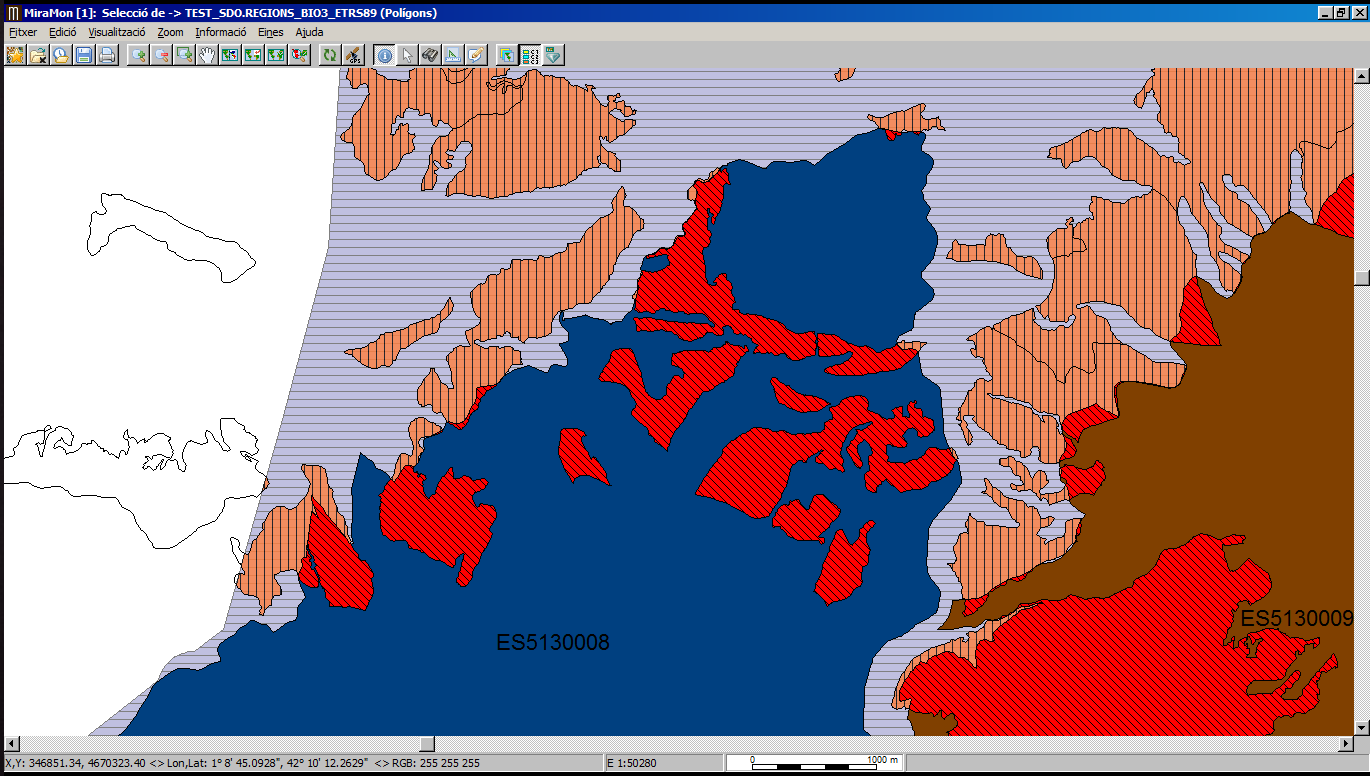
The code conducts a series of processes, that can be seen in the final image and that, in short, they consist of:
Considerations:
To differentiate the case of one habitat present in the biogeographic region with zero covering in all its locations and the case of a habitat that does not even appear on the region, the first case receives, as a surface on the table h_atr.dbf, a zero value, while the last case receives a value -1. This way while making the analysis the procedure returns a result besides it does not appear in the region.
Otherwise, if one habitat present in the biogeographic region does not appear on the layer to analyze, this habitat will not appear in the table e_h_art.dbf.